Enscape for Revit and SketchUp: How It Works and What You Need
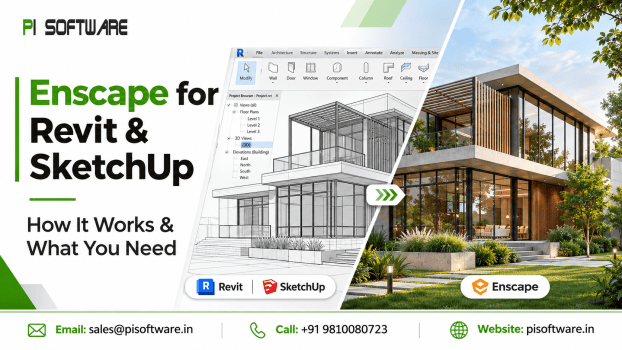
A 3D model may communicate the dimensions and structure of a building, but clients often want to see how the finished space will actually look.
This is where Enscape for Revit and SketchUp becomes useful. Instead of exporting models repeatedly to a separate rendering application, designers can visualize their projects directly within their existing design workflow.
But how does Enscape work, what hardware do you need, and can the same license be used with both applications? Let’s understand what architects, BIM professionals, and design studios should know before getting started.
What Is Enscape and How Does It Work?
Enscape is a real-time 3D rendering and visualization software developed by Chaos. It integrates with supported CAD and BIM applications, allowing designers to turn their existing 3D models into interactive visual presentations.
Unlike traditional rendering workflows that may require separate export and rendering stages, Enscape connects directly with the host application. When supported model changes are made, the visualisation can update in real time.
Its features include:
- Realistic lighting, shadows and reflections.
- Material customisation and texture adjustments.
- 3D walkthroughs and interactive presentations.
- Asset libraries for furniture, people and vegetation.
- Panoramic views and visual exports.
- Virtual reality experiences on supported hardware.
For architects and interior designers, this makes design reviews more interactive and helps clients understand proposed spaces before construction begins.
Enscape for Revit vs Enscape for SketchUp
Although both applications support Enscape integration, their design workflows serve different requirements.
Enscape for Revit
Revit is widely used for BIM-based architectural design, where building elements, materials, and project information are organized within a coordinated model.
With Enscape for Revit, architects can visualize building exteriors, interiors and coordinated design elements without leaving their primary modelling environment.
It is particularly useful for:
- Architectural visualization and design reviews.
- Interior and exterior walkthroughs.
- Presenting BIM models to clients.
- Evaluating materials, lighting and spatial layouts.
Enscape for SketchUp
SketchUp is popular among interior designers, architects, and 3D modeling software professionals for its flexible modelling workflow.
The Enscape plugin for SketchUp helps transform conceptual models into realistic visual presentations. Designers can experiment with materials, lighting, furniture, and spatial arrangements while developing their designs.
It works well for:
- Interior design presentations.
- Residential and commercial concepts.
- Furniture and spatial visualization.
- Client walkthroughs and design approvals.
The key difference is the host application: Revit supports information-rich BIM workflows, while SketchUp offers flexible 3D modeling. Enscape enhances visualization in both ways.
Enscape System Requirements: GPU and RAM
Before installing Enscape, check whether your workstation can handle real-time rendering. Performance depends heavily on the graphics card, particularly when working with detailed models and high-resolution scenes.
According to Chaos documentation, the current Windows requirements include:
| Hardware | Minimum guidance | Recommended guidance |
| GPU | Dedicated GPU with 4GB VRAM | 8GB VRAM or more |
| Graphics | Supported NVIDIA, AMD or Intel Arc GPU | RTX 3070 Ti or AMD RX 6800 class |
| RAM | Sufficient for the host CAD application | 32GB or more is a practical target for demanding workflows |
| Operating system | Windows 10 or higher | Supported, updated Windows system |
For VR workflows, Chaos recommends graphics cards with 12GB VRAM or more.
Remember that these are not universal performance guarantees. Large Revit models, detailed textures, and complex scenes can require considerably more resources. A capable CPU, updated graphics drivers and sufficient system memory also contribute to a smoother experience.
Does Enscape Work with Revit LT?
No. Enscape is not available as a plugin for Revit LT.
This is an important compatibility limitation because Revit LT does not support third-party plugins in the same way as the full Revit version.
If your workflow depends on Enscape rendering, check out your Autodesk software version before purchasing an Enscape license.
Can One Enscape License Work with Both Revit and SketchUp?
Yes. You do not need to purchase a separate Enscape license for each supported CAD application.
The same Enscape licensing arrangement can support applications such as Revit and SketchUp, subject to the applicable license terms and user or seat restrictions.
This is particularly useful for design studios that work across different modelling platforms. However, one license should not be confused with permission for multiple people to use it simultaneously. The number of users and licensing models must match your team’s requirements.
Final Thoughts
Enscape makes architectural visualization more accessible by bringing realistic rendering directly into existing Revit and SketchUp workflows. However, successful implementation depends on more than installing a plugin. Software compatibility, GPU performance, system memory, and licensing requirements all deserve attention.
Before investing, check out your host application version, evaluate your workstation, and understand how your team will use the license.
Ready to improve your architectural visualization workflow? Explore genuine Enscape licensing options with PI Software and request a quotation to find the right solution for your design requirements.
Frequently Asked Questions
1. How does Enscape work with Revit and SketchUp?
Enscape integrates directly with supported versions of Revit and SketchUp, allowing designers to create real-time visualizations from their 3D models without repeatedly exporting them to another rendering application.
2. What GPU is required to run Enscape smoothly?
Chaos specifies a minimum of 4GB VRAM for supported dedicated GPUs, while 8GB or more is recommended for demanding projects.
3. Does Enscape work with Revit LT?
No. Enscape does not support Revit LT because Autodesk restricts third-party plugin support in that edition.
4. Can one Enscape license be used with both Revit and SketchUp?
Yes. A separate license is not required for each supported CAD application. However, simultaneous usage, user assignments, and seat availability depend on the selected licensing arrangement.
5. How do I activate an Enscape license?
Install Enscape, open the supported CAD application and sign in with your Chaos account. For team or floating licenses, the administrator may first need to add users to the organization and configure license sharing.