How Do Marketing Teams Reduce Campaign Production Time Using Adobe Express for Teams?
Ask a marketing team why campaign production feels slow, and most point to the design work itself. It’s rarely the actual bottleneck. Adobe Express Teams
Marketing teams don’t need to create faster — they need to eliminate the steps of slowing down creation. For marketing managers, creative teams, and content leads evaluating Adobe Express for Teams alongside the broader Adobe Creative Cloud stack, that reframe changes what actually deserves investment: not a faster design tool alone, but a workflow that removes the repetitive, non-creative steps consuming most of the campaign production timeline.
Why Campaign Production Becomes a Bottleneck?
The friction isn’t usually creative capability — it’s process:
- Repetitive resizing and reformatting — the same asset rebuilt manually for Instagram, LinkedIn, email, and web, each requiring separate design time.
- Approval delays — feedback scattered across email and Slack, with no clear visibility into what’s pending or who’s blocking sign-off.
- Rebuilding instead of reusing — templates and brand assets that exist somewhere, but aren’t easily findable, so designers recreate work that already exists.
- Brand inconsistency at volume — as content demand grows, maintaining consistent brand application across a growing number of assets and contributors gets genuinely harder without a shared system.
What Adobe Express for Teams Actually Changes?
Adobe Express for Teams isn’t positioned as a faster Photoshop — it’s built around team-wide campaign production specifically:
Shared brand kits, templates, collaborative reviews, and resize/repurpose workflows designed for marketing teams producing high volumes of on-brand content across multiple channels and contributors, not just individual designers working solo.
The Campaign Production Workflow, Start to Finish
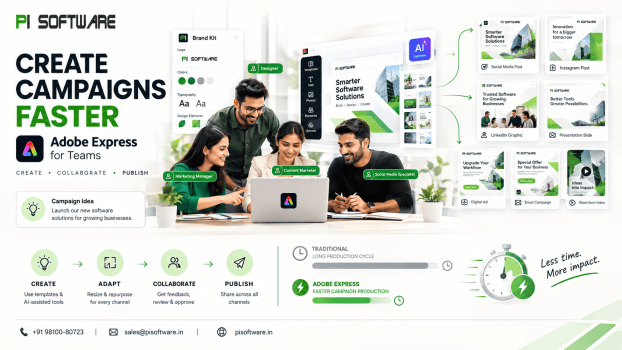
Brief → Template → AI-assisted creation → Review → Resize → Repurpose → Approve → Publish.
Adobe Express for Teams streamlines this chain through reusable templates, shared brand assets, Adobe Firefly-assisted creation, collaborative review, and multi-format resizing. The goal isn’t simply faster design; it’s reducing the repetitive handoffs and rebuilds between brief and publication.
Adobe Express + Firefly: Where AI Actually Fits
Firefly’s role within this workflow is specific, not universal:
- First-draft acceleration — generating initial content variations or background elements within a template, giving the team a starting point rather than a blank canvas.
- Content variation at scale — producing multiple format or messaging variations quickly for A/B testing or channel-specific adaptation.
- Background and asset generation — reducing time spent sourcing or creating supporting visual elements.
Fireflies accelerate repetitive production work, but strategy, brand judgment, and final approval remain in human responsibilities.
How Teams Maintain Brand Consistency at Volume
- Shared brand kits
- Template-first production
- Creative Cloud Libraries integration
- Structured approval
Adobe Creative Cloud Integration
For teams running both Adobe Express and full Adobe Creative Cloud pro applications (Photoshop, Illustrator), the shared brand kit and Creative Cloud Libraries connection means Express isn’t a disconnected, separate tool — content and brand assets flow between Express and the full Creative Cloud suite, letting teams use Express for fast, template-driven production and Creative Cloud applications for more involved design work, without brand consistency breaking between the two.
Adobe Express vs. Canva for Business Teams
Rather than a generic feature list, the practical comparison for marketing teams comes down to:
| Factor | Adobe Express for Teams | Canva for Teams |
| Creative Cloud integration | Native — shared brand kits/libraries with Photoshop, Illustrator, InDesign | Limited — largely a separate ecosystem |
| AI content generation | Adobe Firefly, positioned around commercially safe training data | Canva’s own AI tools, different licensing/training data positioning |
| Brand asset consistency at scale | Strong, via Creative Cloud Libraries connecting Express to full Adobe stack | Solid within Canva’s own ecosystem, but doesn’t extend to Adobe tools |
| Licensing | Enterprise Adobe licensing, often alongside existing Creative Cloud subscriptions | Separate subscription, independent of Adobe licensing |
Measuring Campaign Production Efficiency
- Time per asset
- Campaign production cycle time
- Number of assets produced per production cycle
- Revision rounds
- Approval time
- Content reuse rate
Conclusion:
The marketing teams getting the most value from Adobe Express for Teams aren’t the ones producing individual assets fastest — they’re the ones that restructured the whole production chain: shared templates instead of rebuilding, structured brand review instead of scattered feedback, and resize/repurpose workflows instead of recreating the same asset for every channel. That’s where campaign production time gets recovered, and it’s a workflow question as much as a tool question. For remove the bottlenecks slowing your campaign production down, Talk to an Adobe Express & Creative Cloud Licensing Expert about the right tier for your marketing team.
Frequently Asked Questions
1. How does Adobe Firefly fit into a marketing team’s Express workflow?
Firefly accelerates first-draft content and variation of generation within templates — it doesn’t replace the brief, brand review, or approval steps that require human judgment.
2. Does Adobe Express integrate with Photoshop and Illustrator?
Yes — through shared Creative Cloud Libraries, brand assets and content can flow between Express and full Creative Cloud applications, keeping brand consistency across both.
3. How is Adobe Express different from Canva for business use?
The key practical difference is Creative Cloud integration — teams already using or planning to use Photoshop, Illustrator, or InDesign get connected brand asset consistency with Express that Canva doesn’t offer into the Adobe ecosystem.
4. What’s the biggest production bottleneck Adobe Express actually addresses?
Repetitive resizing, template rebuilding, and unclear approval status — process friction around the design work, not the design creation step itself.
5. How does brand consistency get maintained across a large marketing team?
Through shared brand kits and template-first production enforced structurally, rather than relying on individual designers’ adherence to a style guide.