
How AI Is Changing Chaos Architectural Visualization Ecosystem Without Replacing Artists
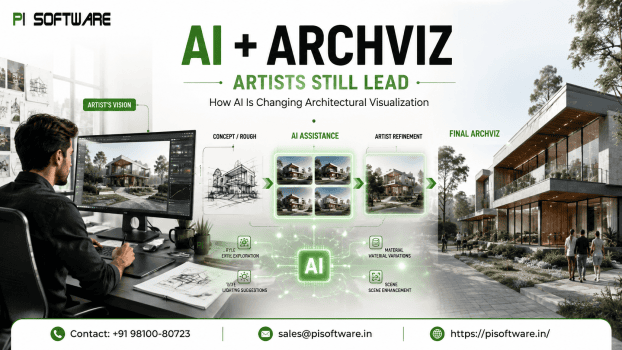
Chaos Architectural visualization studios are under more delivery pressure than ever — faster client turnarounds, more design iterations per project, and rising expectations for photorealistic quality at every stage.
For architects, visualization studios, and design studio owners weighing where AI fits in Chaos Software alongside V-Ray, SketchUp Pro in a professional pipeline, the useful question isn’t “will AI replace this role” — it’s “which parts of the visualization process should AI handle, and which parts still need a human making creative decisions.
Why AI Is Reshaping Architectural Visualization
Expectations reach heights with acceleration of AI’s adoption with users demanding faster design iterations, more options in visualization and photorealistic results in shorter timeframes. Rather than replacing artists, AI helps automate repetitive rendering tasks and speeds up concept exploration
Three forces are driving AI adoption into visualization pipelines simultaneously:
- Client turnaround expectations have compressed. Concept iterations that used to take days are increasingly expected in hours.
- Design iteration volume has grown. Clients want to see more material, lighting, and layout variations before committing — manually rendering every variation doesn’t scale.
- Real-time and cloud rendering have matured alongside AI tooling, making faster iteration technically viable in ways it wasn’t a few years ago.
AI is stepping into the repetitive, high-volume parts of this process — not the creative judgment calls that differentiate one studio’s output from another’s.
What AI Can — and Cannot — Do in Architectural Visualization
AI excels at:
- Concept generation
- Material and lighting exploration
- AI-assisted post-processing
- Image upscaling
Human expertise remains essential for:
- Technical accuracy
- Design intent
- Client storytelling
- Final quality control
Why Artists Remain Central to the Creative Process
Clients hire visualization studios for design thinking and decision-making, not image output alone. That shows up in a few specific places AI doesn’t replace:
- Design intent — translating an architect’s actual spatial and material decisions into an image, not a plausible-looking alternative.
- Technical accuracy — ensuring the visualization reflects the actual BIM model, materials, and dimensions that will be built.
- Client communication — presenting and defending design decisions in a review, which requires understanding why a choice was made.
Enterprise Benefits of AI-Assisted Visualization
- Faster concept-to-client cycle
- Higher client approval rates on first review
- Better resource allocation
- Digital twin and BIM visualization support
AI Tools That Enhance Professional Rendering
- Adobe Firefly and Photoshop AI for generative editing and post-processing.
- Chaos V-Ray and Corona for AI denoising and photorealistic rendering.
- SketchUp, Revit, and Autodesk AI features faster concept development and BIM workflows.
- Real-time renderers like Enscape, D5 Render, Lumion, and Twinmotion for rapid client reviews.
Best Practices for AI Adoption, IP, Licensing, and Ethical AI Usage
- Use AI for ideation—not final delivery.
- Keep human quality reviews.
- Maintain licensed software and clear AI usage policies.
- Understand copyright and commercial licensing before client delivery.
Commercial visualization work carries real IP exposure that studios need policy around, not assumptions:
- Training data and copyright — the provenance of AI-generated content varies by tool, and studios should understand what they’re licensed to use commercially.
- Client contract implications — client agreements increasingly specify whether AI-assisted content is acceptable in deliverables; studios should have a clear, consistent answer.
- Attribution and disclosure — some clients and industries expect transparency about where AI was used in a deliverable, particularly for competitive pitch work.
Conclusion:
Architectural visualization has been drastically changing by integration of AI enabling the artists to spend their time when needed. High volume parts of the process are all AI-assisted with the design intent, technical accuracy, and creative storytelling that clients pay. Studios that build AI thoughtfully into an already-strong, properly licensed visualization pipeline are the ones positioned to deliver faster without compromising the quality that differentiates their work.
If you’re ready to build an AI-assisted visualization pipeline on the right software foundation: Request a Product Demo or Talk to a Visualization Expert of V-Ray, Chaos, or SketchUp Pro’s AI-assisted features integrating AI tools into your existing rendering workflow.
Frequently Asked Questions
1. Does using AI in visualization work raise copyright or IP concerns?
Yes — the provenance of AI-generated content varies by tool, and studios should confirm commercial usage rights before including AI-assisted content in client deliverables.
2. Do I still need licensed software like V-Ray or SketchUp Pro if I use AI tools?
Yes — AI features are largely built into or alongside these tools, not a replacement for them, and commercial licensing terms remain clearer and more contractually sound than most standalone AI generation tools.
3. How much time can AI-assisted workflows actually save?
Savings show up mainly in concept iteration speed and post-processing time — the exploratory and repetitive stages — rather than in the final artist-directed rendering and review pass.
4. What quality control steps should studios add for AI-assisted output?
Dedicated review for AI-specific failure modes — material inconsistency, lighting logic errors, and dimensional inaccuracy — before AI-assisted content reaches client-facing deliverables.
5. What’s a practical first step for a studio adopting AI into its pipeline?
Start with a single well-defined use case — concept variation or post-processing — rather than attempting a full pipeline overhaul and build quality control around it before scaling.