
SketchUp Software for Design Studio: Go vs Pro vs Studio
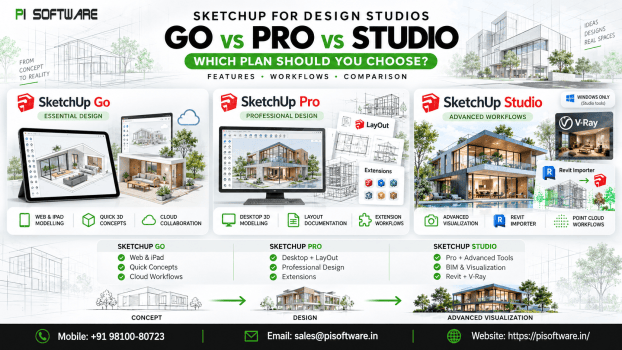
If you are choosing SketchUp software for a design studio, SketchUp Pro is the best starting point for most professional architecture and interior-design teams. SketchUp Go suits lighter browser- and iPad-based modelling, while SketchUp Studio makes sense when your workflow needs photorealistic rendering, Revit imports or point-cloud data.
The right choice depends less on the length of the feature list and more on what your team actually delivers.
Key Point: Choose SketchUp Go for lightweight modelling and mobile work, SketchUp Pro for professional desktop modelling and documentation, and SketchUp Studio when advanced rendering, BIM interoperability or scan-to-model workflows are part of your regular projects.
Which SketchUp Software plan is best for a design studio?
For most architecture and interior-design studios, SketchUp Pro provides the strongest balance of modelling, documentation and flexibility. Go is better suited to simpler or highly mobile workflows, while Studio is designed for teams that need specialist tools beyond everyday modelling.
Here is the practical comparison:
| Your studio workflow | Best option | Why |
| Concept modelling mainly on web or iPad | SketchUp Go | Lower-complexity 3D workflow without desktop tools |
| Architecture or interior design with drawings | SketchUp Pro | Desktop modeller, LayOut and extension support |
| Rendering-heavy presentations | SketchUp Studio | Includes V-Ray for photorealistic visualization |
| Revit-to-SketchUp workflow | SketchUp Studio | Includes Revit Importer |
| Existing-building surveys using point clouds | SketchUp Studio | Includes Scan Essentials |
What should you check before buying SketchUp Software?
Before comparing the SketchUp software price, map the software to your workflow. Start with five questions.
How many people actually need to model?
SketchUp subscriptions are assigned to named users. A license is intended for a specific person rather than a shared login passed around the office. For a 15-person studio, that does not automatically mean buying 15 identical plans. Perhaps eight designers’ model throughout the day, three senior architects mainly review projects, two visualizers need rendering capabilities, and the remaining staff rarely open SketchUp. Understanding who actually uses which tools can help you avoid both under-licensing and unnecessary spending.
Do you need desktop software?
This is one of the clearest dividing lines between Go and Pro. SketchUp Go provides SketchUp for Web and SketchUp for iPad. SketchUp Pro adds the desktop modeller along with professional workflow tools. If your designers spend most of their day building detailed architectural or interior models at desktop workstations, Pro will usually be the more practical option.
Do you produce drawing sets?
If SketchUp models eventually need to become presentation sheets or construction-related documents, look closely at LayOut. LayOut works with SketchUp models so that model changes can be reflected in the associated document. It is included with Pro and Studio but not Go.
Do you need rendering?
If photorealistic output is central to winning approvals or presenting interiors to clients, the comparison changes. SketchUp Studio currently includes V-Ray for SketchUp alongside the tools in Pro. That makes Studio relevant to teams producing polished visualizations rather than only conceptual 3D views.
Do you receive BIM or scan data?
Studios working with consultants, existing buildings, or renovation projects may need more than standard modelling.
Studio includes Revit Importer and Scan Essentials. Scan Essentials lets users work with point-cloud data directly in SketchUp, which can support modelling of existing site or building conditions.
Is SketchUp Go enough for professional design work?
SketchUp Go can be enough when your work is primarily conceptual, mobile, and browser based. It becomes limiting when you need desktop modeling, LayOut or desktop extensions.
Go includes SketchUp for Web, SketchUp for iPad, 3D Warehouse and Trimble Connect.
It can suit:
- early-stage concept modelling
- designers who work primarily from an iPad
- client-side sketching and presentations
- smaller teams that do not produce documentation in LayOut
- occasional 3D users who do not need a desktop workflow
Its main drawback for a full design studio is what it does not include: SketchUp for Desktop, LayOut and Extension Warehouse access available with Pro. For a studio producing detailed interiors, architectural drawings or custom workflows, those differences can become important quickly.
Why is SketchUp Pro the practical choice for most studios?
SketchUp Pro is likely to be the best fit for the typical professional design studio because it combines desktop modelling, documentation and extensibility without requiring every user to pay for specialist Studio features.
Pro currently includes SketchUp for Desktop, Web and iPad, LayOut, PreDesign and Extension Warehouse access, along with professional file interoperability features. That combination suits common workflows such as:
- building the concept in SketchUp;
- developing the model on a desktop workstation;
- using components and extensions to improve productivity;
- preparing presentation or documentation sheets in LayOut;
- exchanging common design files with project partners.
Illustrative example
Consider a 12-person interior-design studio. Seven designers create models and drawings every day. Two people focus heavily on visualization. The remaining three mainly manage projects and review exported material. Rather than selecting a plan only from the company headcount, the studio could evaluate which users require Pro-level modelling and which rendering specialists genuinely need Studio.
When is SketchUp Studio worth the extra cost?
SketchUp Studio is worth considering when V-Ray rendering; Revit interoperability or point-cloud modelling is part of your regular paid work—not simply because Studio is the highest-tier plan.
Studio includes everything in Pro plus specialist capabilities including:
- V-Ray for SketchUp
- Scan Essentials
- Revit Importer
- additional advanced workflow tools
For an architectural visualization team, V-Ray may be the deciding factor. For a studio collaborating regularly with Revit-based consultants, the Revit Importer may improve interoperability. For renovation, surveying, or as-built modelling, Scan Essentials can bring point-cloud information into the SketchUp environment. However, Studio is not automatically a better value for every designer. If eight members of your team only model and document while two create final renders, it may be more sensible to assess plans according to those roles instead of assuming all ten users need the same toolset.
What SketchUp Software buying mistakes should you avoid?
Buying Go because it is cheaper without checking the workflow
Saving on the subscription does not help if the team later discovers it needs desktop SketchUp or LayOut.
Buying Studio for every employee
Studio’s specialist tools are valuable when they solve a real workflow problem. A modeller who never renders, imports Revit data or handles point clouds may not need those additional capabilities.
Sharing one named-user license across several employees
SketchUp subscriptions are intended for named users. Plan your license count around actual users rather than shared office credentials.
Ignoring renewal costs
SketchUp is subscription-based. Include renewals in your software budget instead of treating the first purchase as a one-time capital cost.
Buying unverified license keys
For business use, choose genuine vendor-issued licenses and retain invoices and purchasing records. A suspiciously cheap key can create unnecessary licensing and support problems later.
Which SketchUp Software plan should you buy?
For most new design studios, start your evaluation with SketchUp Pro. Move down to Go only when web and iPad modeling genuinely cover the user’s work. Move up to Studio when rendering, Revit interoperability or point-cloud workflows justify the additional capability.
The goal is not to buy the biggest SketchUp package. It is to give each designer the tools their work requires while keeping licensing simple enough to manage as your team grows.
PI Software supplies genuine SketchUp licenses as an Authorized SketchUp partner, with GST invoicing and support for bulk or volume requirements. If you are choosing SketchUp software for a design studio, share your team size and workflow requirements to get a current recommendation and INR quote.
Need help comparing plans for your team? Request a SketchUp quote from PI Software based on your number of users and actual studio workflow.
Frequently asked questions
1. Which SketchUp plan is best for a design studio?
SketchUp Pro is the strongest default choice for most architecture and interior design studios. It provides desktop modelling, LayOut and extension support, while Studio is better suited to advanced rendering, BIM and point-cloud workflows.
2. What is the difference between SketchUp Go, Pro and Studio?
Go focuses on web and iPad modelling, Pro adds the professional desktop and documentation workflow, and Studio adds specialist tools such as V-Ray, Revit Importer and Scan Essentials.
3. Is SketchUp Pro good for business use?
Yes. SketchUp Pro is designed for professional workflows and is commonly the logical tier to evaluate business design teams. Its combination of desktop modelling, documentation, and extensions makes it more flexible than Go.
4. Do I need SketchUp Studio for rendering?
Studio is the option to examine if you want the included V-Ray for SketchUp workflow. If photorealistic visualization is not part of your work, Pro may be the more economical choice.
5. Can multiple employees share one SketchUp subscription?
A SketchUp subscription license is intended for one named user. Each user should be properly assigned according to SketchUp’s current licensing policy.