
Office 2021 End of Support on 13 Oct 2026: What Indian Businesses Must Do Now
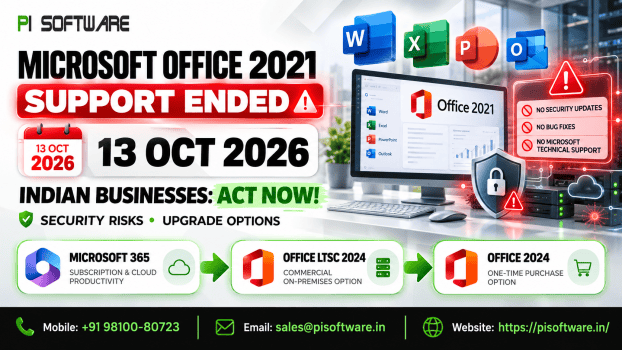
For Indian IT leaders, CIOs, and procurement managers, October 13, 2026 marks a critical deadline: Microsoft officially terminates support for Office 2021 and Office LTSC 2021. While many commercial workstations across Indian SMBs still run these perpetual licenses, continuing to rely on unpatched productivity tools creates immediate operational and security risks. Whether evaluating the Microsoft Office license cost in India, planning for cloud-based Office 365 business plans, or reviewing on-premises Office LTSC 2024, businesses must structure their transition now.
Office 2021 End of Support: What Actually Changes?
Reaching official End of Support (EOS) does not instantly lock users out of desktop applications, but it halts all backend maintenance:
- Zero Security Patches: Microsoft stops releasing updates for newly discovered vulnerabilities, leaving unpatched endpoints exposed to emerging exploits.
- No Bug Fixes: Application crashes, operating system conflicts, and stability issues remain permanently unaddressed.
- No Technical Assistance: Microsoft Customer Support terminates assistance for Office 2021 deployments.
- Cloud Interoperability Limits: Connecting unsupported desktop clients to Microsoft 365 cloud services risks progressive service degradation or connection blocks.
Which Office 2021 Products Are Affected?
The October 13, 2026 EOS applies to all retail and commercial volume-licensed editions governed by Microsoft’s Fixed Lifecycle Policy. Affected products include:
- Word, Excel, PowerPoint, Outlook, and OneNote
- Access and Publisher
- Project and Visio
- Office Home & Business 2021
- Enterprise workstations running Office LTSC 2021
Why Unsupported Office Is a Business Risk
Deferring software upgrades introduces significant operational and compliance liabilities:
- Security Vulnerabilities: Threat actors actively target unpatched desktop software via malicious macros, weaponized email attachments, and memory exploits without official vendor defense.
- Statutory & Audit Risk: Running end-of-life software handling corporate and personal data elevates regulatory exposure under the Digital Personal Data Protection (DPDP) Act and CERT-In cybersecurity directiveson data protection and vulnerability management.
- Ecosystem Drift: Modern endpoint detection (EDR), antivirus agents, accounting software, and ERP plugins eventually discontinue support for deprecated Office builds, leading to integration failures.
How to Find Every Office 2021 Installation
Avoid relying on historical procurement spreadsheets to map your software footprint:
- Automated Discovery: Deploy inventory scripts via Microsoft Intune, Microsoft Endpoint Configuration Manager (MECM), or PowerShell across domain-joined machines to audit installed builds.
- License Type Classification: Separate OEM standalone installs from volume-licensed KMS/MAK deployments.
- Add-In Auditing: Catalog all active COM add-ins and custom automation dependencies.
- Targeted Risk Scoring: Prioritize auditing high-risk endpoints in Finance, HR, Legal, and Executive teams that handle sensitive external documents daily.
Microsoft 365 vs. Office LTSC 2024: Choosing the Replacement
When migrating from Office 2021, organizations generally evaluate modern cloud subscriptions against on-premises perpetual licenses:
| Dimension | Microsoft 365 Apps for Business | Office LTSC 2024 (Commercial) |
| Licensing Model | User-based subscription (monthly/annual) | Device-based perpetual license |
| Feature Updates | Continuous monthly updates and cloud capabilities | Fixed feature set with no new capabilities |
| Cloud & Collaboration | 1 TB OneDrive, Teams, real-time co-authoring | Offline local deployment only (no cloud services) |
| Support Lifecycle | Continuous support under Modern Lifecycle Policy | 5-year Fixed Lifecycle support (until 2029) |
| Best Suited For | Hybrid workforces and modern knowledge workers | Air-gapped workstations, shop floors, and regulated PCs |
When comparing Office LTSC 2024 vs Microsoft 365, Microsoft 365 remains the standard recommendation for knowledge workers requiring co-authoring, automated cloud backups, and Microsoft Copilot AI readiness. Office LTSC 2024 is strictly intended for specialized, air-gapped, or regulated environments.
What to Check Before Migrating
Audit technical dependencies prior to enterprise deployment:
- VBA Macros & Automation: Test financial modeling workbooks, invoice generators, and legacy scripts for 64-bit compatibility to avoid runtime failures when transitioning to modern application architectures.
- Third-Party Add-Ins: Validate CRM toolbars, accounting plugins, and digital signature extensions against modern builds.
- Operating System Readiness: Ensure target machines run supported 64-bit Windows 10 or Windows 11.
- Network Bandwidth: Configure local peer caching or Delivery Optimization to prevent bandwidth saturation during client deployment.
Licensing, GST & 3-Year Total Cost of Ownership (TCO)
Evaluating software expenditure solely by initial license fees distorts actual cost:
- Per-User vs. Per-Device Value: Office LTSC licenses a single machine, whereas Microsoft 365 covers one user across up to five PCs/Macs, tablets, and mobile devices.
- GST Input Tax Credit: Procuring commercial licenses through an established reseller software India partner provides a compliant tax invoice with your corporate GSTIN, allowing eligible businesses to claim an 18% GST Input Tax Credit (ITC).
- Renewal Budgeting: Structure multi-year agreements to protect against currency fluctuations and unplanned renewal escalations.
90-Day Office 2021 Migration Plan
Structure your migration across three manageable phases:
- Days 1–30 (Audit & Planning): Complete endpoint discovery, identify mission-critical VBA macros, determine your Microsoft 365 versus LTSC licensing ratio, and secure licenses.
- Days 31–60 (Pilot & Validation): Deploy Microsoft 365 Apps across a 10% pilot cohort (Finance, IT, Operations) to validate ERP exports and macro stability.
- Days 61–90 (Rollout & Decommissioning): Execute scheduled department rollouts, uninstall legacy Office 2021 builds, and transition files to cloud storage.
Office 2021 Migration Checklist
- Endpoint Audit: Inventory all active Office 2021, LTSC, Project, and Visio installs.
- Dependency Testing: Validate macros, COM add-ins, and ERP reporting tools.
- License Allocation: Select Microsoft 365 tiers or LTSC 2024 for specific roles.
- OS Compatibility: Confirm endpoints meet 64-bit Windows requirements.
- Pilot Validation: Test core workflows with representative user groups.
- Phased Deployment: Execute department rollouts and decommission legacy builds.
Conclusion & Migration Support
The sunset of Office 2021 signals the necessity of modern, supported productivity tools. Running end-of-life software past October 13, 2026 exposes your organization to unpatched security threats, third-party software incompatibilities, and audit complications. Proactive endpoint auditing and structured licensing allow Indian businesses to transition securely.
Modernize Your Office Licensing with PI Software
As an authorized Microsoft partner in India, PI Software assists corporate enterprises looking to buy Microsoft 365 licenses online with complete seat planning, GST-compliant invoicing, and dedicated endpoint onboarding.
Frequently Asked Questions
1. Will Office 2021 stop working on October 14, 2026?
No. Applications will launch normally because perpetual licenses do not expire. However, Microsoft permanently ceases security patches, bug fixes, and technical assistance. IT departments planning ahead should evaluate their options to buy Microsoft Office license replacements to maintain vendor compliance and endpoint protection.
2. What is Office LTSC 2024, and how does it differ from Microsoft 365?
Office LTSC 2024 is a perpetual, device-locked release with a static feature set and no cloud services. Microsoft 365 is a user-based subscription providing continuous feature updates, 1 TB cloud storage, and collaboration tools.
3. Will existing Excel macros and VBA scripts work in Microsoft 365?
Most standard macros work without modification. However, scripts depending on legacy 32-bit controls or deprecated ActiveX components should be tested in a pilot environment prior to full rollout.
4. Does Microsoft 365 require a constant internet connection?
No. Desktop apps run locally on your workstation. An internet connection is only needed periodically (typically every 30 days) to confirm license validity and receive background security updates.
5. Can an organization run a hybrid setup of Microsoft 365 and Office LTSC 2024?
Yes. Many enterprises assign Microsoft 365 to knowledge workers and mobile staff while reserving Office LTSC 2024 for shared factory terminals, test labs, or isolated network segments.