Microsoft Copilot in Teams, Outlook & Excel: Agent Mode Guide
Most Copilot content still treats it like a smarter autocomplete — draft this email, summarize that meeting, write this formula. That description was accurate in 2024. It’s not accurate anymore.
Through 2026, Microsoft Copilot has been moving from single-turn assistance toward agentic, multi-step execution — Agent Mode is now generally available across Word, Excel, and PowerPoint, with the same model arriving in Outlook and Teams. The distinction matters more than it sounds: assistance means Copilot suggests, and you execute. Agentic execution means you describe an outcome, and Copilot plans, acts, and delivers a completed result for your review.
Teams: What Happens After the Meeting?
Meeting summaries were the first Copilot feature everyone saw, and they’re also the most commoditized. The more useful shift is what happens after the summary exists.
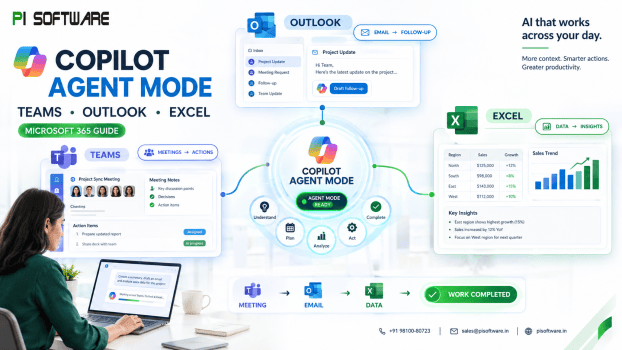
Agentic Copilot in Teams is moving toward turning a discussion into tracked action — identifying who committed to what, flagging decisions that were made versus options that were only discussed, and surfacing what changed since a team member’s last meeting so they can catch up without watching a recording. For a knowledge worker who was double-booked, that’s the difference between missing a meeting and missing the decision that came out of it.
Outlook: From Reading Email to Taking Action
Email backlog is one of the most universal complaints across business leaders, and knowledge workers alike, and Copilot’s evolution in Outlook reflects a shift from drafting help to actual triage and action. Some of these agentic email actions are still rolling out through Microsoft’s Frontier Program rather than being universally available, so IT admins should check current availability against their tenant configuration and update channel before promising this to end users.
The underlying shift is from reading email to acting on it — prioritizing what needs human judgment and letting Copilot handle scheduling coordination and routine acknowledgments. That’s a meaningfully bigger productivity claim than “better email drafts,” and it’s also why rollout needs more planning than flipping on a feature toggle.
Excel: From Asking Questions to Doing the Analysis
This is where the agentic shift is furthest along, and where the ROI case is clearest. Excel’s Agent Mode doesn’t just answer a question about your data — it plans a sequence of steps, executes them inside the workbook (building tables, writing formulas, generating charts), and shows its work for review before you accept the changes.
The Real Shift: Copilot as a Digital Coworker
Put Teams, Outlook, and Excel together and the pattern is consistent: Copilot is moving from “help me do this” toward “handle this workflow for me, and show me what you did.” Microsoft’s own Copilot Cowork — now generally available — makes this explicit: a user defines a task, and the system plans, executes, and delivers a completed deliverable rather than a draft or a suggestion, grounded in the organization’s actual data and context.
That’s a genuinely different category of tool than a chatbot bolted onto Office, and it changes what “rolling out Copilot” actually requires. None of this works well without five things being true first:
Clean, well-structured data. Copilot’s Excel and Teams outputs are only as reliable as the data and documents it’s grounded in. Scattered file structures and inconsistent naming undercut agentic accuracy before it starts.
Defined workflows. Agentic Copilot performs best against clear, repeatable processes — status reporting, standard analysis templates, recurring meeting types. Ad hoc, undocumented workflows give it less to work with.
Appropriate permissions and governance. As Copilot gains the ability to act — sending drafts, editing shared workbooks, executing multi-step tasks — Microsoft Purview governance and admin-level Copilot controls become a deployment requirement, not an afterthought. IT teams should also budget for usage-based Copilot Credits through the admin center’s Cost Management Dashboard as agentic features scale.
Employee adoption. The productivity gain from Agent Mode or Cowork is theoretical until employees trust it enough to actually delegate work to it — which requires training, not just a license assignment.
A way to measure it. Time saved on meeting follow-ups, reduction in email-driven admin work, faster Excel workflow completion, and content-generation speed are all measurable — but only if you define the baseline before rollout, not after.
Conclusion
The interesting story in Microsoft Copilot right now isn’t a feature list across Teams, Outlook, and Excel — it’s the steady move from AI that helps you work to AI that does defined pieces of the work and hands you a result to approve. That shift changes what a successful rollout looks like: it’s no longer about training employees to write better prompts, it’s about having clean data, defined workflows, the right permissions, and a governance framework in place before agentic Copilot starts acting inside your organization’s day-to-day systems.
If you’re evaluating microsoft 365 apps for business, deciding which Copilot tier fits your team, or planning governance before rolling out agentic features, schedule a call with PI Software’s reseller software India team — we help IT leaders structure the right Microsoft software license and deployment plan before Copilot reaches live workflows, not after a stalled rollout.
Frequently Asked Questions
1. What is Agent Mode, and how is it different from regular Copilot chat?
Regular Copilot chat responds to a single prompt with a suggestion or draft. Agent Mode plans a multi-step task, executes actions directly inside the app (like a workbook or document), and returns a completed result for review — closer to delegation than assistance.
2. Do we need to buy a separate Copilot Credits plan for agentic features?
Some of the newer agentic capabilities, including Copilot Cowork, run on usage-based billing tracked through a Cost Management Dashboard in the admin center. IT teams should plan this consumption model alongside standard per-user licensing.
3. How do Excel Workbook Rules help a small finance or ops team?
They let you define formatting, naming, and formula standards once, inside the workbook itself, so every team member using Copilot on that file produces consistent output — removing the inconsistency that comes from different people prompting Copilot differently.
4. How should we measure Copilot’s productivity ROI instead of just assuming it’s helping?
Set a pre-rollout baseline on specific metrics — time spent on post-meeting follow-ups, average email response time, hours spent on recurring spreadsheet tasks — then measure the same metrics 60–90 days after rollout with defined use cases.
5. What governance controls do we need before turning on agentic features?
Microsoft Purview governance policies, admin-level Copilot access controls, and defined data permission boundaries should be in place before agentic execution features (which can send drafts or edit shared files) are enabled organization-wide.