Why Creative Teams Are Building AI-Assisted Workflows Instead of AI-Only Workflows
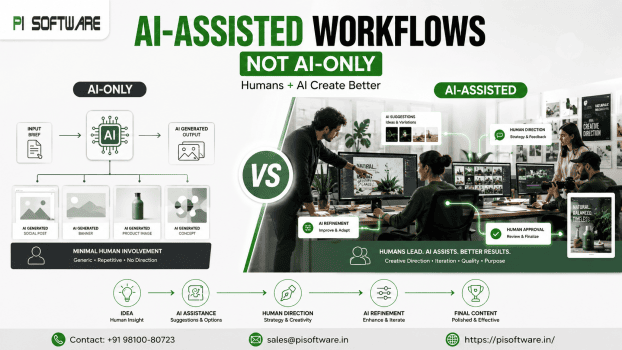
Two versions of “AI in creative work” are being pitched to enterprise teams right now, and they produce very different outcomes. One treats AI as a generation engine — prompt in, finished asset out, humans mostly reviewing at the end.
The organizations getting real productivity gains without sacrificing brand trust are consistently choosing the second model. The future belongs to AI-assisted creatives — not AI-generated creativity. For creative directors, design managers, and IT decision-makers evaluating Adobe Creative Cloud,Firefly, and Microsoft Copilot licensing for their teams, understanding why that distinction matters is the difference between AI that compounds a team’s output and AI that quietly erodes it.
What Is AI-Assisted Workflows?
AI-assisted workflows embed AI tools at specific points in a creative process — ideation, first-draft generation, variation exploration, repetitive production tasks — while keeping humans responsible for creative direction, brand judgment, and final quality control. The AI accelerates; it doesn’t own the outcome.
This is distinct from AI-only workflows, where AI generates a finished (or near-finished) asset with minimal human involvement beyond a prompt and a final glance
AI-Assisted vs. AI-Only Workflows
| Factor | AI-Only Workflow | AI-Assisted Workflow |
| Human involvement | Prompt input, final review | Embedded throughout: direction, iteration, quality control |
| Creative originality | Bounded by training data patterns | Human-directed, AI-accelerated |
| Brand consistency | Inconsistent without heavy prompt engineering | Maintained through human brand judgment at each stage |
| Quality control point | End of process (hardest, costliest point to catch issues) | Throughout the process (cheapest point to catch issues) |
| Scalability | Fast per-asset, but risky at volume without review capacity | Scales because repetitive tasks are automated, judgment isn’t |
| Client/brand trust | Vulnerable to generic or off-brand output | Preserved through human creative ownership |
Why Enterprises Are Choosing Human + AI Collaboration
- Brand consistency requires judgment AI doesn’t reliably have
- Quality control is cheaper earlier in the process
- Client and stakeholder trust depends on visible creative ownership
- Revision cycles shrink
Limitations of AI-Generated Creative Work
- Generic pattern output.
- Brand voice drifts.
- No accountability for creative decisions.
- IP and originality uncertainty.
- Assistance that accelerates production without replacing editorial decisions.
- Microsoft Copilot — AI assistance across Microsoft 365, relevant to creative teams for content planning, briefs, and cross-functional collaboration documents.
Enterprise Governance Matters:
AI-assisted content volume growth makes structured review workflows more important, not less:
- Defined approval gates — clear checkpoints where brand and quality review happen, especially for AI-accelerated first drafts.
- Human review specifically for brand voice and visual identity drift, not just factual accuracy.
- Commercial usage rights vary by AI tool — understanding what a given license permits commercial creative work matters before scaling AI-assisted content production.
- Enterprise security — licensed Adobe and Microsoft AI tools operate within enterprise security and data handling agreements that ad hoc consumer AI tools typically don’t provide.
Why Licensed Adobe and Microsoft AI Tools Matter for Enterprise Governance
Licensed enterprise tools provide governance and compliance advantages that ad hoc AI tools generally don’t:
- Commercially safe training data (notably Adobe Firefly’s positioning) reducing IP exposure risk in commercial creative work.
- Enterprise security and data handling agreements appropriate for brand-sensitive and client-confidential creative work.
- Consistent, auditable licensing — clear terms for commercial usage rather than ambiguous consumer-tool licensing.
- Integration within existing professional tools, keeping AI assistance inside a governed, familiar workflow rather than requiring data to leave the managed environment.
Conclusion:
The creative organizations getting real value from AI aren’t the ones generating the most content the fastest — they’re the ones that redesigned their workflows around AI and humans working together, with AI absorbing repetitive production work and humans retaining the creative judgment, brand governance, and accountability that actually build audience trust. Book an AI Workflow Consultation To map which parts of your creative pipeline are ready for AI assistance.
Frequently Asked Questions
1. Why do AI-only workflows risk brand consistency?
Because quality control happens at the end of the process, after creative decisions are already made — brand voice or visual drift is much harder and costlier to catch and fix at that stage.
2. Does using AI tools raise copyright concerns for enterprise creative work?
It depends on the tool — Adobe Firefly’s positioning around commercially safe training data reduces this risk compared to less transparent generative AI tools, but usage rights should always be confirmed before scaling commercial output.
3. How does Microsoft Copilot fit into creative team workflows?
Copilot supports content planning, briefs, and cross-functional collaboration within Microsoft 365, complementing Adobe’s design-focused AI tools rather than replacing creative production tools.
4. How do we measure ROI from AI-assisted creative workflows?
Track content production time savings and revision cycle reduction alongside brand consistency metrics — productivity gains without a consistency check can mask a quality problem.
5. What’s the biggest risk of moving to AI-only creative production?
Reduced originality and brand trust — AI-generated content without human direction tends toward generic patterns and is more prone to subtle brand voice drift.