Photoshop vs Illustrator vs InDesign: Which Adobe App Do You Need?
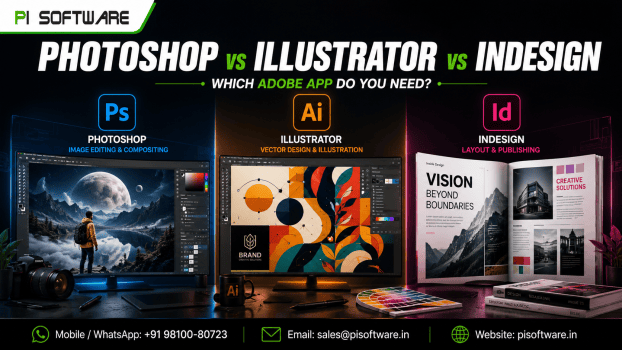
Picking design software isn’t simply about features. The right application can save production time, improve creative output, and avoid unnecessary software expenses for designers, photographers, marketing agencies, and businesses. With all of Adobe’s specialized applications, it can be difficult to know where to invest your time.
Photoshop vs Illustrator vs InDesign – which one should you use?
All three are popular with pro designers, marketing departments, photographers, and creative agencies. But they are built for different purposes.
So, before purchasing an Adobe subscription, let’s understand what each application does, where it performs best and which one makes the most sense for your professional requirements.
1. Adobe Photoshop: For Image Editing and Creative Visuals
If you work with photographs, digital artwork, advertising creatives, or visual content, Adobe Photoshop is probably the application you need.
Photoshop is used mainly for raster graphics. The image consists of individual pixels. It provides designers with a lot of control over image editing, color correction, background removal, retouching, and creative compositions.
Say, an eCommerce business may need to crop out distracting backgrounds, improve product lighting, and create attractive promotional images as they get product listings ready. With Photoshop, all these are easy, all in one application.
Businesses exploring the Adobe Photoshop price in India should consider whether an individual Photoshop subscription is sufficient or whether a broader Creative Cloud plan would offer better value.
2. Adobe Illustrator: For Logos, Branding and Vector Graphics
Photoshop is excellent for working with photographs, but what happens when you need a logo that looks equally sharp on a visiting card and a large outdoor billboard?
That’s where Adobe Illustrator comes in.
Illustrator is a vector-based design application. Instead of relying on fixed pixels, it uses mathematical paths, curves, and shapes to create artwork that can be resized without losing its sharpness.
For branding agencies and businesses, this makes Illustrator particularly valuable for developing consistent visual identities across different marketing platforms.
When comparing the Adobe Photoshop vs Illustrator applications, remember that Illustrator is better suited to scalable artwork, whereas Photoshop offers greater flexibility for detailed pixel-based image editing.
3. Adobe InDesign: For Professional Layouts and Publishing
If your work involves creating company profiles, brochures, product catalogues, magazines, or lengthy reports, Adobe InDesign is designed for exactly these requirements.
Unlike Photoshop and Illustrator, InDesign focuses on page layout and publishing. It helps organize text, images, typography, columns, margins, and page elements into structured, professional documents.
For businesses researching the Adobe InDesign price in India, it is worth evaluating how frequently their teams create multi-page documents before choosing an individual application or an all-apps subscription.
Photoshop vs Illustrator vs InDesign: Which One Is Better?
Understanding their differences becomes easier when you compare them against actual business and creative requirements.
| Feature | Photoshop | Illustrator | InDesign |
| Primary purpose | Image editing | Vector design | Page layout |
| Graphic type | Raster | Vector | Layout-based |
| Best for | Photographs | Logos and illustrations | Brochures and catalogues |
| Image resizing | Can lose sharpness | Scales without quality loss | Depends on placed assets |
| Typography | Image compositions | Creative lettering | Advanced text layout |
| Ideal users | Photographers | Graphic designers | Publishers and marketers |
In simple terms:
- Photoshop edits and transforms images.
- Illustrator creates scalable graphics.
- InDesign brings text and visual elements together into professional publications.
The three applications complement each other rather than replace one another.
Should You Buy Individual Adobe Apps or Creative Cloud?
If your work primarily involves photography, Photoshop may be sufficient. Branding professionals may priorities Illustrator, while publishing teams should consider InDesign.
However, creative agencies and businesses managing multiple design requirements may benefit from a broader Adobe Creative Cloud plan.
Explore Adobe products at PI Software or visit the Adobe software range to review available options.
Final Thoughts
Photoshop, Illustrator, and InDesign aren’t competing for applications; they are tools designed to solve different creative challenges. Photoshop handles images, Illustrator creates scalable graphics, and InDesign brings complete publications together.
The best investment is the one that matches your actual workflow rather than simply choosing the application with the most features.
Looking for genuine Adobe software for your creative work or business? Explore PI Software to review available Adobe solutions and licensing options.
Need help choosing the right subscription? Request a quotation from PI Software and discuss your requirements before making your next software investment.
Frequently Asked Questions
1. Which is better, Photoshop or Illustrator?
Photoshop is better for photo editing and pixel-based graphics, whereas Illustrator is better for logos, illustrations, and scalable vector artwork. The right choice depends on your project.
2. Can Photoshop, Illustrator and InDesign be used together?
Yes. Designers can edit photographs in Photoshop, create vector elements in Illustrator, and combine everything into brochures or catalogues using InDesign.
3. Which Adobe software is best for beginners?
Start with Photoshop if you want to learn image editing, Illustrator for vector design or InDesign for page layouts. Your intended career or creative requirements should guide your choice.
4. What is the Adobe Creative Cloud price in India?
Adobe Creative Cloud pricing depends on the selected plan, subscription and user requirements. Team plans and individual subscriptions can have different pricing.
5. Can businesses purchase Adobe licenses for multiple employees?
Yes. Businesses can explore team licensing options based on their number of users and software requirements.