How Interior Designers Are Combining SketchUp and AI Visualization Tools?
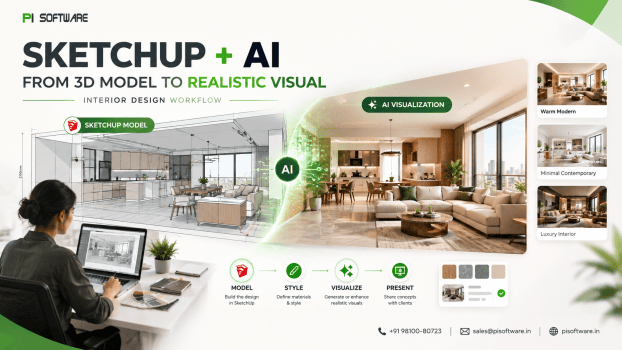
There are two very different versions of “AI in interior design” circulating right now. One is AI-only image generation — type a prompt, get a pretty picture with no connection to a real, buildable space. The other is AI layered on top of an actual SketchUp model — real geometry, real scale, real material logic — using AI to accelerate exploration and presentation without losing the design accuracy a client’s actual project depends on.
For interior designers, architects, and visualization studios evaluating whether to buy SketchUp Software in India, that’s the workflow worth building: AI-assisted, not AI-only, with the designer’s own geometry, materials, and spatial judgment staying firmly in control throughout.
Why Are Interior Designers Adding AI to SketchUp Workflows?
The pressure is familiar to any studio: tight presentation deadlines, clients wanting to see more concept directions before committing, and revision cycles that eat into project margin every time a client can’t quite visualize what’s being proposed. AI-assisted tools address a specific piece of this — rapid visual exploration — without requiring designers to abandon the modeling discipline that makes a concept buildable.
The Modern SketchUp + AI Workflow
- Model in SketchUp Pro — real geometry, scale, and spatial layout established first, as the foundation everything downstream builds on.
- AI-assisted concept exploration (SketchUp Diffusion or similar image-to-image tools) — generating stylistic and material variations from the actual model, not from a blank prompt.
- Refined rendering (V-Ray or Enscape) — once a direction is selected, moving to full, accurate rendering for final client-facing deliverables.
- Human review and correction — checking material accuracy, lighting logic, and design intent before anything reaches the client as final.
AI Image-to-Image Workflows:
SketchUp Diffusion and similar image-to-image AI tools take an existing SketchUp view as a starting reference and generate stylistic variations from it — different material palettes, lighting moods, or finish directions, applied to the same real spatial geometry rather than generating a new space from scratch. This is genuinely useful for:
- Rapid material exploration
- Moodboard generation
- Interior styling variations
AI for Concept Exploration vs. Final Visualization
| Stage | Purpose | Appropriate Tool |
| Concept exploration | Rapid direction testing, client alignment on style | AI image-to-image (SketchUp Diffusion) |
| Material/moodboard development | Fast palette and finish variation | AI-assisted, reviewed by designer |
| Final client presentation | Accurate, buildable, client-approved visuals | V-Ray or Enscape full rendering |
| Construction documentation | Precise, dimensionally accurate output | SketchUp model not AI-generated |
SketchUp + V-Ray vs. AI Visualization:
V-Ray’s physically based rendering produces accurate material response, real lighting behavior, and dimensional fidelity — exactly what a final client deliverable needs. AI image-to-image tools produce fast, exploratory variation without that same accuracy guarantee. A firm treating AI as a replacement for buying V-Ray Software, rather than a fast front-end to it, is optimizing speed at concept stage while sacrificing the accuracy final deliverables require.
Enscape occupies a related but distinct role: real-time rendering for live client walkthroughs and interactive design review, sitting between AI’s speed and V-Ray’s final fidelity.
How AI Helps Designers Iterate Faster
- Concept iteration time — testing multiple material and style directions in a single working session rather than across several full render passes.
- Client feedback speed — clients responding to several visual directions quickly rather than waiting through sequential full renders for each option.
- Revision reduction — clients who’ve seen and reacted to multiple AI-accelerated directions early tend to give more decisive feedback once a direction is locked in, reducing revision rounds after the final rendering stage.
AI Visualization Mistakes Designers Must Catch
- Presenting AI-generated concept images as final deliverables without a full rendering pass.
- Letting AI introduce material inconsistencies that don’t reflect real, specifiable products.
- Skipping human review of lighting logic.
- Losing design intent to AI’s statistical defaults — without a strong underlying model and clear direction.
- Treating scale and dimension as flexible in AI-generated output.
Conclusion:
The interior design and architecture firms getting real value from AI visualization aren’t the ones generating disconnected AI images — they’re the ones using AI to rapidly explore variations of a real, accurate SketchUp model, then moving to precise rendering once a direction is confirmed. Transform your concept sketches into client-ready AI renders faster than ever. Get 100% authentic SketchUp Pro and Studio licenses backed by dedicated local support.
Frequently Asked Questions
1. What is SketchUp Diffusion actually useful for?
Rapid material, style, and mood board exploration from an existing model view — fast concept-stage variation, not final client-approved deliverables.
2. Can I use AI-generated images as final client presentation deliverables?
Not recommended — AI image-to-image output can introduce material and lighting inconsistencies that don’t hold up as accurate, buildable final visuals; a full V-Ray or Enscape rendering pass is still the appropriate final step.
3. How is AI visualization different from using V-Ray or Enscape?
AI tools are fast and exploratory, well suited to early concept and material testing; V-Ray delivers accurate, physically based final rendering; Enscape supports real-time interactive review — each serves a different stage of the same workflow.
4. Does AI-assisted visualization actually reduce client revisions?
It can — clients who see and react to multiple concept directions early tend to give more decisive feedback once a direction is chosen.
5. What mistakes should designers watch for when using AI in their workflow?
Presenting AI concept images as final deliverables, unchecked material or lighting inconsistencies, and dimensional accuracy assumptions that don’t reflect the real